The best SOP software for Shopify DTC brands in 2026
Ten tools, ranked against the three things that actually break documentation in an ecommerce operation. Including where ours loses.
Search for the best SOP software and you get a dozen lists ranking the same tools for a business that could be a dental practice, a factory, or a software company. The rankings are not wrong. They are just answering a question a DTC operator did not ask.
An ecommerce operation has three specifics that change which tool wins, and none of them show up in a generic feature grid. This is the list rewritten for those specifics. Ten tools, what each is genuinely best at, what it costs, and one honest limitation each. One disclosure up front: ReccordSOP is our product. It is judged by the same test as everything else, and we name where it loses.
Pricing was checked against public pricing pages in July 2026. Vendors change tiers often, so treat the numbers as the shape of the market rather than a quote.
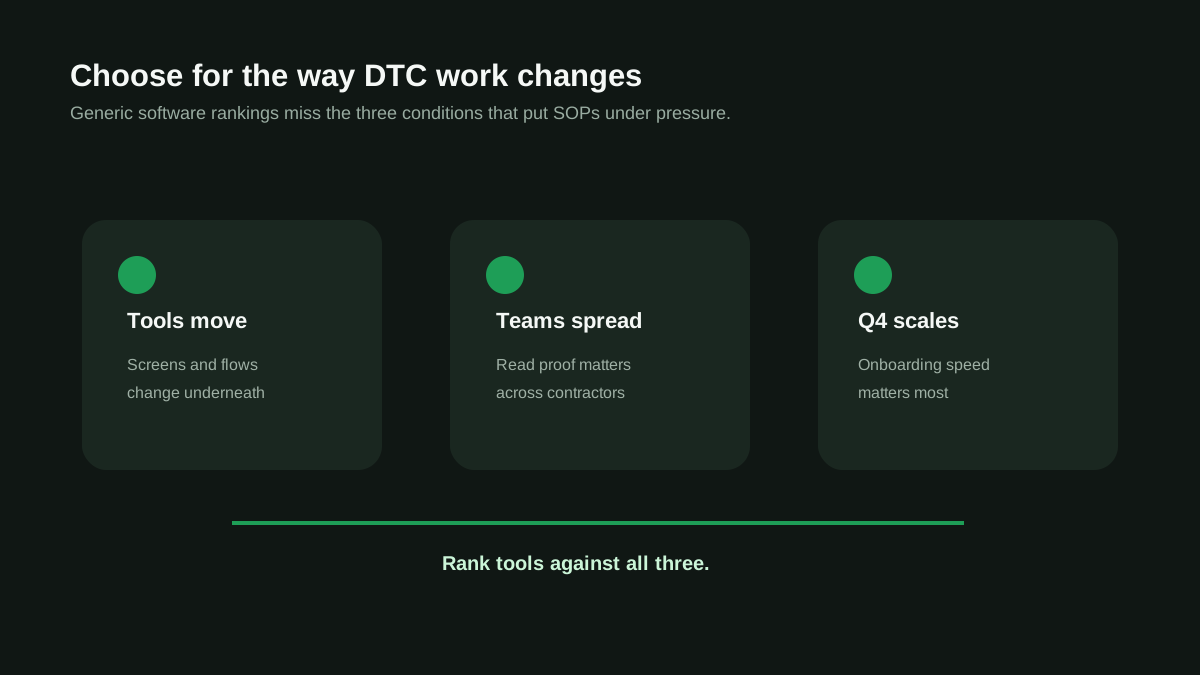
Why the generic rankings mislead DTC teams
Three realities separate ecommerce operations from the businesses these lists are usually written for:
- Your processes live inside other companies' software. A refund SOP is really a Gorgias SOP plus a Shopify SOP. When Klaviyo redesigns its flow builder, your screenshots are wrong that afternoon, and nothing tells you. Documentation in a DTC stack decays faster than documentation anywhere else.
- Your team is rarely all in one place. Offshore CX, contract fulfillment help, an agency running email, a bookkeeper who touches the store monthly. Writing the procedure is the easy half; knowing whether the person who needed it actually read it is the half that matters.
- Q4 is a different company. Headcount can double for eight weeks, then halve. Onboarding speed in October is worth more than any feature you will use in March.
Rank the tools against those three and the order changes. A platform with beautiful training paths is worth less than a tool that tells you the refund SOP stopped matching reality three weeks ago.
All 10 tools at a glance
| Tool | Best for | Entry price | Biggest limitation for DTC |
|---|---|---|---|
| ReccordSOP (ours) | Recording a process once and being told when it goes stale | $19/user, 3-user minimum | No browser click capture; newest tool here |
| Scribe | Fast browser click-capture guides | $13-17/seat, 5-seat minimum | No video upload, no assignment or sign-off |
| Tango | Guided walkthroughs pinned inside your tools | About $24/seat | Browser-only, no acknowledgment trail |
| Trainual | Structured onboarding and training programs | Quoted by team size, historically $200+/mo | Every SOP is written by hand |
| Process Street | Recurring checklists with approvals | About $100/mo | No capture; built for workflows, not reference docs |
| SweetProcess | Simple procedure library with completion tracking | About $99/mo for 20 members | No video conversion, thin analytics |
| Whale | Video-to-SOP plus training accountability | About $99/mo | Built horizontal; nothing DTC-specific |
| Waybook | Playbook-style libraries with training modules | Per user, quoted on request | Cost climbs quickly as the team grows |
| Notion | Teams already living in Notion | About $10/user | No SOP structure, no staleness signal |
| ClickUp | Teams that want docs beside tasks | Free tier; paid from about $7/user | Documentation is a side feature, not the product |
Capture-first tools
These turn a process you perform into a document, fast. They are the right answer when the bottleneck is that nobody has time to write anything down.
Scribe
The category leader for browser click capture. You click through a process and Scribe writes the guide with screenshots as you go, which beats recording a video when the whole process lives in a browser tab. For a DTC team, that covers a lot: tagging orders in Shopify admin, building a segment in Klaviyo, running a refund in Gorgias.
Where it stops: no video upload at all, so anything involving a desktop app, a phone, or a warehouse is out of scope. And the management side is thin, with roles arriving only at the enterprise tier and no way to assign a guide or collect a sign-off on any plan. Note the five-seat minimum when comparing the headline per-seat price.
Tango
Click capture with a twist worth knowing about: Tango can pin walkthroughs inside the tools your team is actually using, so the guidance appears in context rather than in a document someone has to go find. For onboarding a seasonal CX hire into a helpdesk, that is genuinely useful. Same limits as Scribe otherwise: browser-only, and no acknowledgment trail.
Video to SOP: 12 converters compared
If your processes are already recorded as Loom or Zoom walkthroughs, this is the deeper comparison of the tools that convert them.
Try it on one of your own procedures.
Record a process once, AI writes the structured SOP. 3 free SOPs, no credit card.
Management-first platforms
These assume the documents already exist and solve the harder problem: getting people to read and follow them. None of them can watch a video.
Trainual
The most complete accountability loop on this list. Assign by role, department, or location with due dates on every plan, collect e-signatures, run tests, report on completion. If your Q4 hiring wave needs a structured onboarding program rather than a document library, Trainual is the strongest answer here.
The catch is authoring. Its AI writes text and generates quizzes, and you can embed recordings, but nothing converts a recording into a procedure. Every SOP is still written by a person, which is exactly the work most DTC teams never get around to. Pricing is quoted by company size and lands well above the rest of this list for small teams.
Process Street
Built for recurring workflows rather than reference documentation. Procedures become checklist runs with conditional logic, approvals, and analytics, which fits the parts of DTC ops that repeat on a schedule: daily order review, weekly inventory checks, the BFCM readiness sequence. If your problem is 'the same eight things need to happen every Monday,' this is the tool.
It is a poor fit for the other half of documentation, the reference procedures people read once when something unusual happens. And there is no capture, so every workflow starts as a blank template.
SweetProcess
The simplest tool in this group, and that is the point. Write a procedure, assign it as a task, track completion. Small DTC teams adopt it quickly because there is very little to learn. The trade is that it does nothing you cannot describe in one sentence: no video conversion, limited analytics, and no signal at all about whether a procedure has gone out of date.
Waybook
Playbook-shaped: procedures organized into structured libraries with training modules, progress tracking, and read receipts. It sits close to Trainual in spirit with a lighter feel. Two things to check before committing: pricing is per user and quoted rather than published, and several operators report the cost curve steepening as the team grows, which matters if your headcount swings seasonally.
The two that do both
Most of this market either turns a recording into a document or manages documents that already exist. Two tools do both, and the difference between them is who they were built for.
Whale
Whale converts video into SOPs and then runs a real program on top: training flows assigned by role, AI-generated quizzes, completion dashboards, and review cycles with named owners. Its usage-based insights flag content that looks neglected, which is a genuine staleness signal inferred from behavior.
It is built horizontal, aimed at EOS-run companies, franchises, and general SMB. Nothing in it knows what Klaviyo is. If you are not an ecommerce brand, it is the tool on this page we would point you at.
ReccordSOP
Ours, so weigh it accordingly. Record a process once and it becomes a structured SOP with a screenshot for every step. From there it runs the loop: department-scoped access so support sees support and ops sees ops, assignments with due dates, read acknowledgments, checklist runs that can repeat weekly or monthly, view analytics, an audit log, and freshness digests when a procedure passes its review horizon. Entry is $19 per user per month with a three-user minimum, and the free tier covers three SOPs with no card.
Two things make it different from Whale for this specific audience. First, focus: the built-in template library ships procedures for the DTC stack itself, with a set for each of Klaviyo, Gorgias, Recharge, Loop Returns, ShipBob, Yotpo, Postscript and the rest, plus the cross-tool ones like BFCM customer service and chargeback disputes. If you are not on that stack, the specificity does nothing for you. Second, the staleness mechanism. Where Whale infers neglect from usage, ReccordSOP lets you re-record the process months later and compares the new recording against the documented steps, showing which steps changed. That is a direct answer to the first reality above, the one where a Klaviyo redesign silently invalidates your screenshots, and no other tool on this page compares a fresh recording against the existing document.
Where it loses: there is no browser click capture, so a quick one-off browser guide is genuinely faster in Scribe or Tango. There are no quizzes or training tests, so a formal onboarding program is better served by Trainual. And it is the newest tool on this list, which means the shortest track record and the smallest review history. If those matter more to you than drift detection, pick accordingly.
The 13-feature side-by-side comparison
Feature grid across ReccordSOP, Scribe, Tango, Trainual, Process Street, and Notion, if you want the detail behind this summary.
The generalists
Neither of these is SOP software. Both are where most DTC brands actually keep their procedures today, which is why they belong on the list.
Notion
Under roughly 30 procedures and a team of five, Notion is fine, and pretending otherwise would be dishonest. It is cheap, everyone knows it, and a tidy wiki beats a tool nobody opens. Above that, the flexibility turns against you: no SOP-specific structure, no assignment or sign-off, no last-reviewed discipline, and nothing whatsoever that tells you a page has gone stale. Most brands graduate off Notion for procedures somewhere around $1M in revenue, usually after a bad handover.
ClickUp
The argument for ClickUp is proximity: the procedure sits beside the task it belongs to, and many DTC teams already run projects there. The argument against is that documentation is a side feature of a project management product, so it inherits none of the things a documentation tool should do, including any concept of a procedure being out of date.
How to choose in five minutes
- Nothing is written down and nobody has time: a capture tool. Scribe or Tango if the work is browser-only, ReccordSOP or Whale if it is not.
- The documents exist but nobody follows them: Trainual for training programs, SweetProcess for a simple library, Process Street for anything recurring.
- Your Q4 hiring wave is the forcing function: Trainual or Waybook, both built around structured onboarding.
- Your documentation keeps going out of date and you find out from a customer: this is the drift problem, and only Whale and ReccordSOP address it at all.
- You are on the Shopify DTC stack and want the templates to already exist: ReccordSOP.
- You have fewer than 30 procedures and five people: stay in Notion and spend the money on something else.
Free tool: do you actually need SOP software?
Six questions about how your processes run today. It tells some teams no, which is the point: the honest answer for a three-person shop is usually a shared doc.
Take one real process you already run, ideally a messy one like a refund exception or a damaged-on-arrival claim, and put it through your two finalists end to end. The differences in output quality are obvious immediately, and you will know within one attempt which editor you can live in. Most tools here have a free tier, so this costs nothing but the ten minutes.
Free SOP software: what is actually free
The free tiers on this page compared honestly, including what each one gates and which catch hurts least.
SOP drift: why your documentation is lying to you
The problem behind reality one: why procedures are wrong within 90 days, and the audit that catches it before a customer does.
Whichever tool wins, the thing that decides whether it was worth the money is not the writing. It is whether anyone maintains what gets written. Pick for the system that keeps procedures true, and the documentation part takes care of itself.
Frequently asked questions
What is the best SOP software for a Shopify store?
It depends on which problem you have. If nothing is documented, a capture tool that turns a recording into a procedure is the fastest route: ReccordSOP or Whale for anything beyond the browser, Scribe or Tango for browser-only workflows. If procedures exist but nobody follows them, Trainual, SweetProcess, or Process Street add assignment and completion tracking. For a Shopify DTC team specifically, the differentiator worth paying for is staleness detection, because documentation built on Klaviyo, Gorgias, and Shopify admin goes out of date every time those tools change.
Do I need dedicated SOP software, or is Notion enough?
Notion is genuinely enough below roughly 30 active procedures and a team of about five. Past that it starts failing in three specific ways: there is no way to assign a procedure and know it was read, no structure that keeps procedures consistent between authors, and no signal when a page no longer matches reality. Most DTC brands move off Notion for procedures around $1M in revenue, and the trigger is usually a handover that went badly.
What is the difference between SOP software and training software?
SOP software documents how work is done and keeps that documentation current. Training software, like Trainual, wraps procedures into structured learning paths with quizzes, completion records, and onboarding programs. Most DTC brands need the first before the second: the procedures have to exist and be accurate before there is anything worth training on.
How much does SOP software cost for a small DTC team?
For a team of three to five, expect roughly $50 to $100 per month across most of this market. Per-seat tools land between $13 and $24 per user, though several carry seat minimums that raise the real entry price. Flat-rate platforms like SweetProcess, Process Street, and Whale sit near $99 per month. Training-first platforms are the expensive end, quoted by company size. Free tiers exist on most tools and are usually capped by document count.
Which SOP tools tell you when a procedure is out of date?
Almost none. Most tools show a last-edited date, which tells you when someone touched the document rather than whether it is still correct. Whale infers neglect from usage patterns. ReccordSOP compares a fresh recording of the process against the documented steps and flags which steps changed. That gap matters most for ecommerce teams, because procedures built on third-party tool interfaces break every time those tools ship a redesign.
Ready to record your first SOP?
3 free SOPs to start. No credit card required. See if drift detection keeps your docs honest.
Start for freeI built ReccordSOP after watching too many DTC ops teams lose months to undocumented workflows. These SOPs are battle-tested with Shopify operators running $1M to $50M brands.
Last reviewed August 6, 2026
Related reading
Video to SOP: 12 tools compared, and the test that actually matters
Seven of these tools can turn a recording into a document. Only two can also tell you who read it. That gap is the whole comparison.
SOP drift: why your documentation is lying to you
Most SOPs are wrong within 90 days of publishing. Here's how to detect it before it costs you a customer.
How to build a DTC SOP library that doesn't go stale
Most SOP projects don't fail because the docs are bad. They fail because nobody follows them and nobody updates them.