Video to SOP: 12 tools compared, and the test that actually matters
Seven of these tools can turn a recording into a document. Only two can also tell you who read it. That gap is the whole comparison.
Search Google for a video to SOP converter and you get a dozen vendor landing pages making the same promise: upload a recording, AI writes the procedure. The promise is real. It is also a commodity. Speech-to-text plus a language model is a solved problem, and at least seven tools on this page do it competently.
So this comparison is not about who can generate a document. It is about what happens after the document exists. Can you assign it to the three people who need it, with a due date? Can you prove they read it? Can you see which procedures are going stale? For an operations team, that loop is the job. The document is just the input.
We checked every pricing page and feature list on this page in July 2026. One disclosure up front: ReccordSOP is our product. It is in the same table, judged by the same test, and we tell you plainly where it loses. No affiliate links, no sponsored spots.
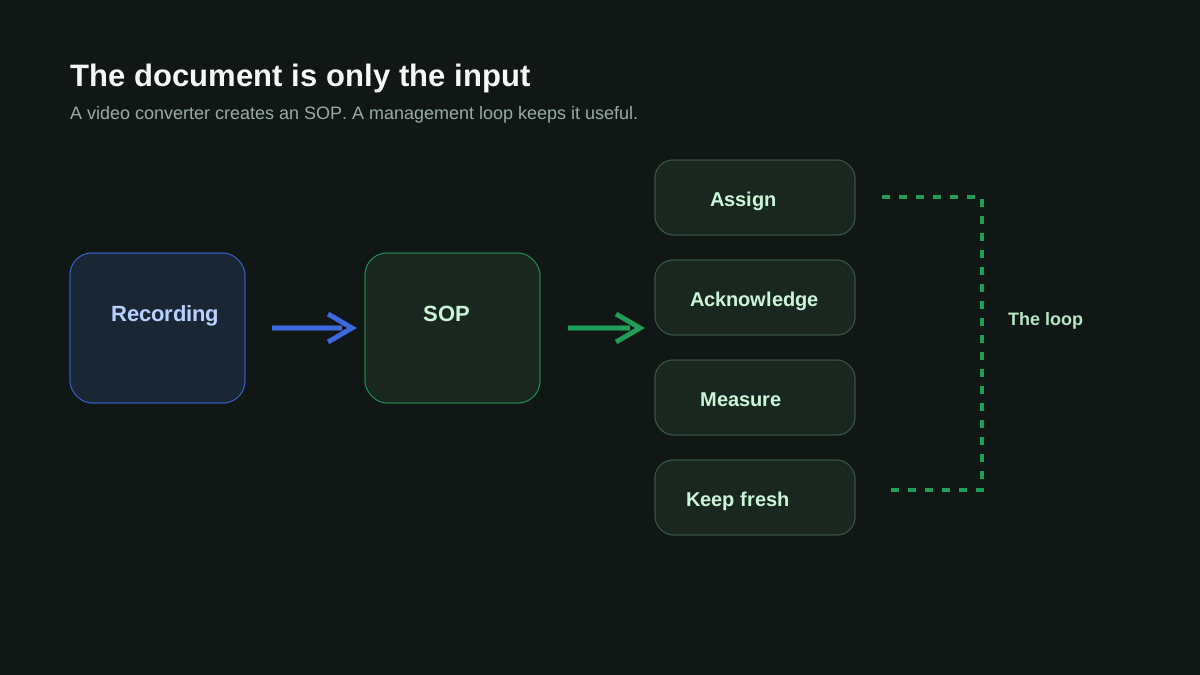
The management-loop test
Here is the test we scored every tool against. It has four parts, and they are the difference between a document generator and an SOP system:
- Assign: can you give a specific SOP to specific people, with a due date?
- Acknowledge: is there proof of who actually read or signed off on it?
- Analytics: can a manager see views, completions, and which docs are ignored?
- Staleness: does anything tell you when the SOP no longer matches reality?
Roles and permissions are deliberately not on that list. Nearly every tool has some version of viewer-editor-admin, and it tells you nothing. The loop is what separates the two camps this market splits into.
The market splits into a creation camp that can turn video into documents but cannot run the loop, and a management camp that runs the loop but cannot touch video. Only two products do both.
All 12 tools at a glance
Prices are entry-level paid tiers, verified against each vendor's public pricing page in July 2026. Vendors change pricing often, so treat these as the shape of the market rather than gospel:
| Tool | Entry price | Video to SOP | Assign + acknowledge | Analytics | Camp |
|---|---|---|---|---|---|
| Scribe | $13-17/seat, min 5 | No (click capture) | No | Basic insights | Creation |
| Guidde | Free for 25 videos; $19-39/mo | Yes | No | Business tier | Creation |
| Tango | About $24/seat | No (click capture) | No | Usage analytics | Creation |
| Glitter | $15-20/seat | Yes (5-30 min caps) | No | No | Creation |
| Trails | $29 solo; $49 for 5 users | Yes | No | No | Creation |
| Clueso | $120-200/mo, billed yearly | Yes | No | No | Creation (video studio) |
| Docsie | $170/mo | Yes (incl. Loom URLs) | Approvals only, no reader tracking | $750 tier only | Creation (enterprise docs) |
| ScreenApp, Kommodo | Free tiers | Yes | No | No | Creation (one-offs) |
| Trainual | On request | No (AI writer only) | Yes: due dates + e-signatures | Full reporting | Management |
| SweetProcess | About $99/mo, 20 members | No | Yes: completion tracking | Yes | Management |
| Process Street | About $100/mo | No | Yes: checklist runs + approvals | Yes | Management |
| Whale | About $99/mo | Yes | Yes: training flows + quizzes | Yes | Both |
| ReccordSOP (ours) | $57/mo for 3 users | Yes (25 conversions/mo) | Yes: due dates + acknowledgments | Yes | Both |
The creation camp
These tools are genuinely good at making documents fast. They fail the loop, which is fine if a document is all you need.
Scribe
The category leader for browser click capture. You click through a process and Scribe writes the guide with screenshots as you go, which is faster than recording a video when the process lives entirely in a browser. Two things to know: it does not accept uploaded video at all, and the management side is thin. Roles arrive only at the Enterprise tier, and there is no way to assign a guide or collect an acknowledgment on any plan.
Guidde
Video-first: it captures workflows and produces polished how-to videos with AI narration, and it converts existing MP4s into knowledge base articles. The Business tier adds real viewer analytics, an activity feed, and engagement insights, which is more visibility than most of this camp offers. What it lacks is the other half of the loop: nothing can be assigned, and nothing tracks sign-off.
Tango
Click capture like Scribe, with a twist: its guides can pin walkthroughs inside the tools your team uses, and it reports usage. Closer to guided training than to documentation. Still no video upload and no acknowledgment trail.
Glitter and Trails
The two newest capture tools, and the most price-aggressive. Glitter converts Zoom and Loom recordings into searchable step-by-step guides from $15 per seat. Trails does the same from $49 for five users, with version history and clean sharing controls. Both stop at the document. On Glitter, even adding and removing team members is an Enterprise feature.
Clueso
Different animal: Clueso is a video production studio. It takes a rough screen recording and produces a polished training video with studio voiceover, auto-zooms, and 4K export, plus a written article on the side. If your deliverable is customer-facing training content, it is the strongest tool on this page. It is also 2 to 4 times the price of everything else here, and it has no concept of an SOP program.
Docsie
The edge case. Docsie is an enterprise knowledge-base platform that happens to convert video well, including pasted Loom and YouTube URLs, and its multimodal AI reads on-screen text rather than leaning on narration alone. Versioning and approval workflows push it partway toward the management camp, but there is no way to assign a document to readers or collect acknowledgments, and analytics sit on its $750 tier. Built for documentation teams shipping ISO-grade manuals, not for an ops manager tracking who read the refund policy.
The management camp
These platforms run the loop properly. None of them can watch a video.
Trainual
The incumbent for SMB training programs, and the most complete loop on this page: assign by role, department, or location with due dates on every plan, e-signatures for acknowledgment, tests, and full reporting. The catch is authoring. Trainual's AI writes text and generates quizzes, and you can embed recordings, but nothing converts a video into a procedure. Every SOP is still written by a person, which is exactly the work this category promised to remove.
SweetProcess and Process Street
Both run assignment and tracking well. SweetProcess assigns procedures as tasks and tracks completion. Process Street turns procedures into checklist runs with approvals and analytics, which suits recurring workflows more than reference documentation. Neither touches video. If your processes are already written down and you only need the loop, either one does the job.
Try it on one of your own procedures.
Record a process once, AI writes the structured SOP. 3 free SOPs, no credit card.
The two that do both
Twelve tools can turn a video into an SOP or manage one. Only two can do both: convert the recording, assign the result, prove who read it, and flag it when it goes stale.
Whale
Whale earns its place here. It converts video into SOPs, then runs a real program on top: training flows assigned by role or group, AI-generated quizzes, a completion analytics dashboard, and review cycles with named owners. Its AI Insights feature watches usage data and flags stale content for review, which is a genuine staleness signal, inferred from behavior. Whale is built horizontal: its world is EOS-run companies, franchises, and general SMB. At around $99 per month it is the tool we would point a non-ecommerce business at.
ReccordSOP
Ours, so judge accordingly. ReccordSOP converts screen recordings into structured SOPs, then runs the loop: department-scoped access (support sees support, ops sees ops), assignments with due dates, read acknowledgments, view analytics, an audit log, and freshness tracking with stale-SOP email digests. Entry is $57 per month for three users, with unlimited SOPs and 25 AI video conversions a month.
Two honest differences from Whale. First, focus: ReccordSOP is built for Shopify DTC operations, with templates for Klaviyo flows, Gorgias macros, Recharge subscriptions, and BFCM runbooks. If you are not an ecommerce brand, that specificity does nothing for you. Second, the staleness mechanism: where Whale infers staleness from usage patterns, ReccordSOP lets you re-record the process months later and has AI compare the new recording against the documented SOP, showing exactly which steps changed. No other tool on this page compares a fresh recording against the existing document.
Where ReccordSOP loses: there is no browser click capture, so quick one-off browser guides are faster in Scribe or Tango, and it does not produce polished narrated video output like Clueso or Guidde. The output is a living document, not a video.
Turning Loom and Zoom recordings into SOPs
A common starting point: you already have a library of Loom walkthroughs or recorded Zoom trainings and want documents out of them. Four paths, roughly in order of effort:
- Loom AI itself can generate an SOP from a Loom video. The result stays inside Loom as text, with no assignment, acknowledgment, or library structure around it.
- The ChatGPT method: pull the transcript, paste it with a prompt. Free, works once, loses every screenshot, and produces a file you now have to store and maintain somewhere.
- Docsie accepts pasted Loom and YouTube URLs directly and builds structured docs from them, aimed at knowledge base teams, from $170 per month.
- Upload the MP4 to any converter in this comparison. Most accept MP4, MOV, and WebM exports, which covers Loom, Zoom, and every screen recorder.
How to turn a Loom video into an SOP
- Open the video in Loom and download it as an MP4 (owner or workspace admin permissions required; the download option lives in the share menu).
- Upload the MP4 to your converter. Narrated walkthroughs convert best, because the transcript carries the why behind each click.
- Review the generated steps against the video once. AI reliably catches what you said and did; it cannot catch the step you skipped because you always do it from muscle memory.
- Delete or archive the Loom. Two sources of truth for one procedure is how drift starts.
If the recording has no narration, expect thinner output from every tool on this page. A silent screen recording gives the AI only pixels to work with, so record a 60-second narrated redo of the process rather than fighting to salvage a mute one.
How to turn a Zoom recording into an SOP
- Download the cloud recording as MP4 from the Zoom web portal (Recordings tab). Grab the audio transcript file too if your plan generates one.
- Trim the recording to the demonstration itself. A 40-minute training call where the process demo starts at minute 22 converts badly; the 6-minute demo alone converts well.
- Upload the trimmed MP4. Screen-share segments become steps with screenshots; talking-head segments become supporting context.
- Check speaker attribution in the result. A call where two people talk over the demo can leave instructions phrased as conversation, which needs a quick edit pass.
Whichever path you take, the same question applies afterward: where does the document live, who is assigned to read it, and what tells you when it is out of date. Converting a backlog of recordings into a folder of unread documents mostly relocates the problem.
SOP to video: the reverse direction
Some teams search for exactly the opposite conversion: they have written SOPs and want training videos out of them, because new hires watch and do not read. Different tools serve that direction. Guidde generates polished how-to videos with AI narration from captured workflows, and Clueso turns rough recordings into studio-grade training video. Neither starts from a plain text document, so the honest workflow is: perform the procedure once while recording, let one of those tools produce the video, and keep the written SOP as the version you maintain.
Worth asking before you invest in either direction: video is the format that goes stale hardest. A written SOP with screenshots can be corrected in two minutes when a button moves. A narrated video has to be re-recorded. If your process changes quarterly, written documentation with a video walkthrough as a supplement ages far better than video as the primary format.
The free generators
ScreenApp, Kommodo, and a rotating cast of similar tools offer free video-to-SOP generation, and for a genuine one-off they are the right call. Paste a video, download the document, done. The trade is everything after: no library, no ownership, no loop, and free tiers that change terms without notice. Fine for documenting one process for a contractor. The wrong foundation for the 40 procedures a real operation runs on.
A generated SOP starts going stale the day it is published. Teams change the process, tools move their buttons, policy shifts in Slack. Whatever converter you pick, the real cost of your documentation is the system that keeps it true, not the minutes saved writing it. ReccordSOP is the only tool in this comparison with drift detection: it flags when a documented SOP stops matching how the process actually runs.
How to choose
- You need one document, once: a free generator, or the ChatGPT transcript method.
- Your processes live in a browser and you want guides fast: Scribe or Tango.
- Your deliverable is polished training video for customers: Clueso, or Guidde at a lower price.
- Your SOPs are already written and you only need assignment and tracking: Trainual, SweetProcess, or Process Street.
- You want video conversion and the management loop, general business: Whale.
- You run a Shopify DTC brand and want conversion, the loop, and proof your docs still match reality: ReccordSOP.
Almost every tool here has a free tier. The fastest evaluation is to take one real recording of one real process and run it through your two or three finalists. The output quality differences are obvious within ten minutes, and you will know which editor you can live in. ReccordSOP's free tier includes 3 SOPs and drift detection, no card required.
SOP software comparison: the full market
The wider comparison beyond video conversion: Scribe, Tango, Trainual, Process Street, SweetProcess, and Notion, feature by feature.
Free SOP software: what's actually free
Six free tiers compared honestly: what each one gives you, what it gates, and which catch hurts least.
SOP drift: why your documentation is lying to you
Why every SOP is wrong within 90 days, and the 30-day audit that catches it. The problem this whole category eventually runs into.
The DTC tool SOP library
Ready-made procedures for Klaviyo, Gorgias, Recharge, ShipBob, and the rest of the Shopify DTC stack.
Frequently asked questions
Can ChatGPT turn a video into an SOP?
Partially. Pull the transcript from your recording, paste it into ChatGPT with a prompt, and you get a reasonable text procedure. You lose every screenshot, the numbering usually needs cleanup, and the output is a loose file with no assignment, acknowledgment, or staleness tracking. It works for a one-off; it does not scale to a documentation program.
Can Loom AI create an SOP from a Loom video?
Yes. Loom AI can generate a text SOP from any Loom recording you own. The document lives inside Loom, so there is no way to assign it, track who read it, or organize it into a permissioned library. Most teams use it as a starting draft and move the result somewhere with structure.
What is the difference between an SOP generator and SOP management software?
A generator turns an input (video, transcript, prompt) into a document and stops. Management software runs the loop after the document exists: assigning it to people with due dates, collecting read acknowledgments, reporting on views and completion, and flagging stale content. Most tools marketed as video-to-SOP converters are generators. Trainual, SweetProcess, and Process Street are management platforms without video conversion. Whale and ReccordSOP do both.
Which video-to-SOP tools track who actually read the SOP?
Of the twelve tools in this comparison, only two combine video conversion with read tracking: Whale (completion tracking through training flows and quizzes) and ReccordSOP (read acknowledgments with an audit log). Guidde shows viewer analytics but has no acknowledgment or sign-off. The pure converters (Glitter, Trails, Clueso, ScreenApp, Kommodo) track nothing after the document is created.
Can I convert an SOP into a video instead?
No tool in this comparison generates video from a text document. What works: screen record yourself following the written SOP, then hand that recording to Guidde or Clueso for a narrated video. Treat the written version as the source of truth, since a video has to be fully re-recorded every time the process changes.
Ready to record your first SOP?
3 free SOPs to start. No credit card required. See if drift detection keeps your docs honest.
Start for freeI built ReccordSOP after watching too many DTC ops teams lose months to undocumented workflows. These SOPs are battle-tested with Shopify operators running $1M to $50M brands.
Last reviewed August 6, 2026
Related reading
SOP drift: why your documentation is lying to you
Most SOPs are wrong within 90 days of publishing. Here's how to detect it before it costs you a customer.
How to build a DTC SOP library that doesn't go stale
Most SOP projects don't fail because the docs are bad. They fail because nobody follows them and nobody updates them.
Operations playbook for DTC brands between $1M and $10M
The messy middle of DTC, where the founder-led playbook stops working and the enterprise playbook doesn't fit yet.